For this year’s annual GMTK Game Jam, a couple of friends and I developed Mr. Machine’s Pillow Factory in Godot. The concept is that of an incremental game about stuffing feathers into pillows to cushion an impending nuke.
One very interesting question that came up during the jam was that of optimization. As one of our main design goals was to allow the game to support a very large number of feathers on-screen at any time, we ran into performance problems quite early in the jam.
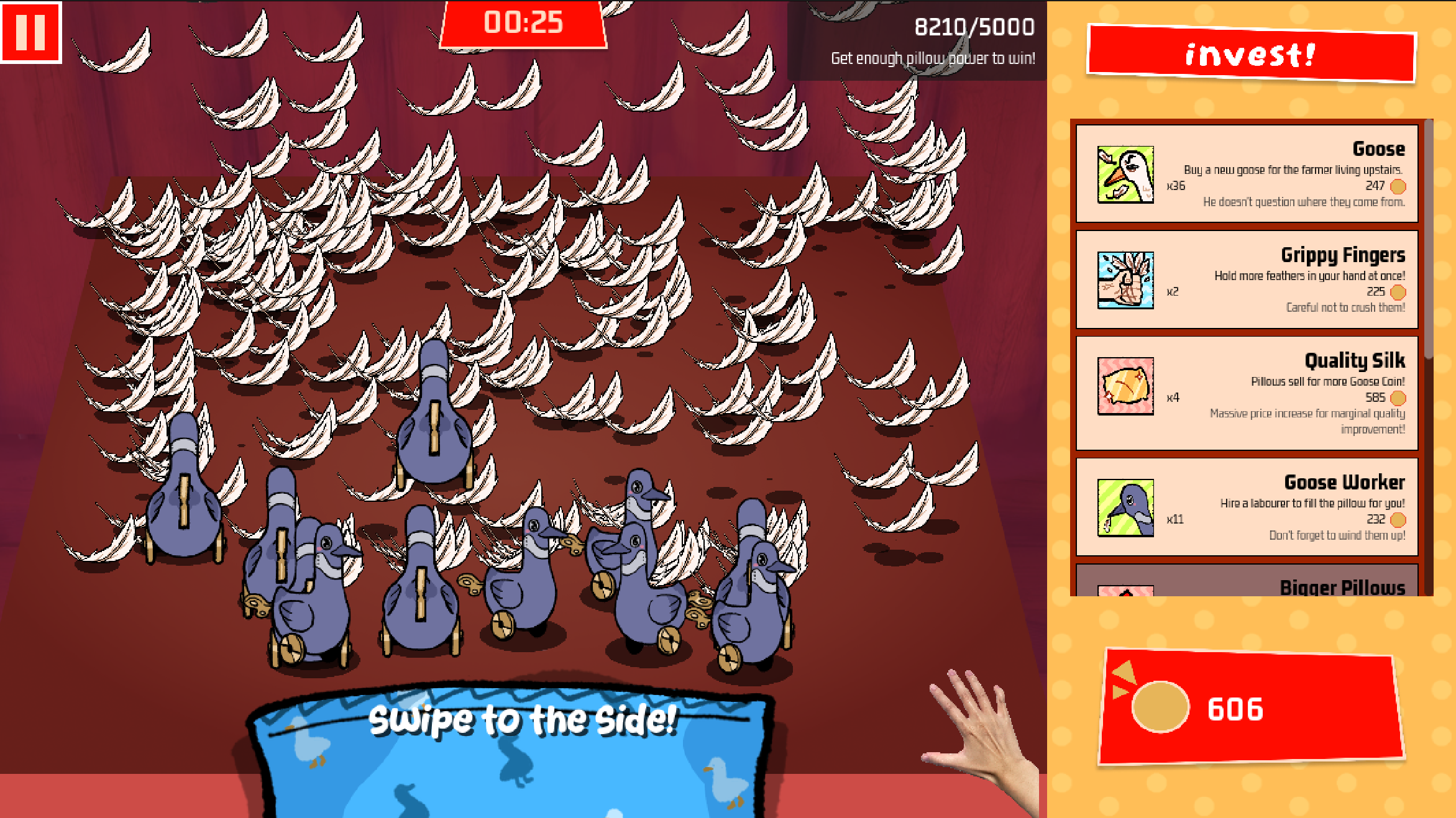
In our initial prototype, feathers were implemented as nodes with sprites and areas. While playable, it became rapidly apparent that this approach would not be scalable. In the editor, the game would dip below 60 FPS at around 600 feathers, an amount that was certainly not enough for the game to feel “full of feathers.”
After some investigation, we determined that the issue was our approach of making every feather a node. Although nodes are very lightweight in Godot, they still add overhead. Even after toggling off sprites and areas, the pure existence of around 1000 feather nodes was enough to tank the overall FPS.
To address this, we had to implement feathers using a constant number of nodes. The solution was to use Godot’s built-in Server singletons, which allow you to perform actions like draw images or register physics areas without adding additional nodes to the Scene Tree.
Drawing with RenderingServer
All of Godot’s servers work by identifying engine resources using RIDs (Resource IDs). The servers thus take RIDs as parameters when working with said resources.
To replicate sprite rendering behaviour in the RenderingServer, we can first request a new CanvasItem from the RenderingServer. The RenderingServer will give us a new RID associated with a new CanvasItem, and we can use this RID wih other RenderingServer methods to set the properties of this CanvasItem.
1
2
3
4
5
6
7
8
9
10
## Create a new CanvasItem, get its RID
var rid := RenderingServer.canvas_item_create()

## We can set relevant properties by calling methods with rid

# On initialization...
RenderingServer.canvas_item_add_texture_rect(rid, Rect2(-FEATHER_TEX.get_size() / 2.0, FEATHER_TEX.get_size()), FEATHER_TEX)
RenderingServer.canvas_item_set_material(rid, FEATHER_MAT.get_rid())
RenderingServer.canvas_item_set_parent(rid, parent_canvas_item_rid)
RenderingServer.canvas_item_set_visible(rid, false)
To create a new feather, we call canvas_item_create() for a new RID. Then, we setup the texture by adding a texture rect (offset by half of the texture size so the texture is centered on the CanvasItem’s position), setting a material, assigning a parent canvas item, and setting visible to false to prevent a teleport flicker on the first frame.
Note that in order for the CanvasItem to render, it has to be assigned to a Canvas. We do this in the step where we assign the CanvasItem as a child of a different CanvasItem (by setting the feather’s parent). Namely, we set the parent to a node already in the scene that we intend to hold all feather CanvasItems as children. We can fetch a node’s CanvasItem RID with the following logic:
1
2
3
4
5
6
7
## To fetch a CanvasItem node's RID...

var parent_canvas_item_rid: RID

# ...

parent_canvas_item_rid = parent.get_canvas_item()
Then, every frame, we update the feather’s transform with its currently stored rotation, scale, and position/offsets, as well as setting visibility if the feather is active.
In the jam system, we store all of these feather-specific properties in a bunch of packed arrays, where the feather’s ID serves as the index. We can then iterate over the indices of feathers we are interested in to update them, such as in an update method that moves airborne feathers closer to the ground. Other game systems can also force-update feather properties by calling setters which take index IDs.
1
2
3
4
5
6
7
8
9
10
11
12
13
14
15
16
17
18
19
20
21
22
23
24
25
26
27
28
## Called every physics frame...
func fall_feathers(delta: float) -> void:

    for idx: int in falling_indices: # We track which feathers are airborne

        # Really convoluted code that basically means move the feather's Y offset down by linear fall velocity
        feathers[idx << 1].z = maxf(feathers[idx << 1].z - delta * FALL_PER_SEC, 0.0)

# ...

## Called every frame...
func render_feathers() -> void:

    # Iterate over every feather
    for idx: int in range(idx_counter):

        ## Fetch/compute a bunch of values from storage arrays...

        # ...

        ## We can store all RIDs in a global array for later access, like here
        var rid := feather_canvas_item_rids[idx]

        RenderingServer.canvas_item_set_transform(rid, Transform2D(rot, scale_vec, 0.0, pos_vec))
        RenderingServer.canvas_item_set_visible(rid, visible)
        RenderingServer.canvas_item_set_z_index(rid, int(feather_x_y_vert_offset.y))

        # ...
While it is technically very important that you free all of your RIDs after you are done using them in order to avoid a memory leak, in our project we decided to pool feathers for re-use. That is, we keep a queue of unused feather IDs to be popped first when new feathers are requested. Corresponding CanvasItems that are not in use have their visibility hidden. Therefore, we did not have to deal with any freeing of RIDs.
1
2
3
4
5
6
7
8
9
10
11
12
13
14
15
## Create a new feather and get the idx
## Returns -1 if a new feather cannot be created
func create_new_feather() -> int:

    var next_idx := idx_counter
    if not idx_pool.is_empty():
        next_idx = idx_pool.pop_back()
    else:
        if idx_counter >= MAX_FEATHER_CAP:
            return -1
        _append_empty_feather() # Allocate a new RID in here

    _create_feather_at_idx(next_idx) # Initializes transform, visibility, etc.

    return next_idx
With all of this logic, we could now render >2000 feathers at a cool 60FPS! However, all of these feathers were merely visual. In order to play the incremental game, we still had to allow the player to scoop up and move the feathers.
Input Areas with PhysicsServer2D
Previously, feather input detection was done using area-on-area contact. Since the player could expand their grabbing range, we used one area to represent the hand. Every feather had an additional area which the hand area would detect entering/exiting.
We decided to continue with this logic. Since there was only one hand, the hand area would continue being a regular area node. All of the feathers, however, would have their areas created without nodes.
The Godot PhysicsServer2D is very similar to the RenderingServer. The only difference is that instead of assigning objects to a canvas, we must assign them to a space. You might have heard of spaces if you’ve done anything involving raycasting.
1
2
3
4
5
6
7
8
9
10
11
12
13
14
## Somewhere before, fetch a 2D node's space...
space_rid = parent.get_world_2d().space

## Somewhere before, create a new shape on the PhysicsServer2D...
var shape_rid := PhysicsServer2D.circle_shape_create()
PhysicsServer2D.shape_set_data(rid, AREA_RADIUS)

## Create a new Area2D, get its RID
var rid := PhysicsServer2D.area_create()

# On initialization...
PhysicsServer2D.area_add_shape(rid, shape_rid) # Shared CircleShape2D
PhysicsServer2D.area_set_space(rid, space_rid) # Space RID
PhysicsServer2D.area_set_collision_mask(rid, feather_collision_mask)
After creating the areas, we decided to set their collision masks to only detect the hand area. Due to some jank issues with the hand area not detecting the PhysicsServer2D areas, we instead used the area monitor callback on the feather areas to detect when the hand area entered/exited and emit a signal from there.
1
2
3
4
5
6
7
8
9
10
11
12
## Veryyyyy long function signature
func _feather_area_monitor_callback(status: PhysicsServer2D.AreaBodyStatus, _area_rid: RID, _instance_id: int, _area_shape_idx: int, _self_shape_idx: int, feather_idx: int) -> void:

    match status:
        PhysicsServer2D.AreaBodyStatus.AREA_BODY_ADDED:
            feather_hovered.emit(feather_idx)
        PhysicsServer2D.AreaBodyStatus.AREA_BODY_REMOVED:
            feather_unhovered.emit(feather_idx)

## To wire up the area...
## (Note we bind the rightmost argument as the feather's ID)
PhysicsServer2D.area_set_area_monitor_callback(area_rid, _feather_area_monitor_callback.bind(idx))
From this, we were able to detect input, and thus with some additional state tracking were able to re-implement feather grabbing/dragging/dropping!
And the Juice?
Of course, now that we didn’t have nodes, it was a lot more tricky to add juice elements such as popping, tweening, flashing, etc. since we were missing the conventional OOP-style encapsulation.
The solution to this was to make the majority of the juice based on registered tweens of ID-indexed properties.
For example, in order to make a feather fade out, a system from elsewhere would tween the opacity value of a feather with a particular index. However, we would make sure to register the tween with the feather system so that if another system wanted to create a new animation tween, the existing tween would be killed prior to the activation of the new tween.
This system is quite precarious, since it is very possible that a new tween might start from a suboptimal visual starting point, or that large “jumps” may occur between animations if values are assigned at the start of a tween. However, for this project, the registry approach worked well enough!
1
2
3
4
5
6
7
8
9
10
11
12
13
14
15
16
17
18
19
20
21
22
23
24
## Track tweens...
var feather_tweens: Dictionary[int, Tween] = {}

## Stop any tween on the current feather idx
func kill_feather_tween(idx: int) -> void:

    if feather_tweens.has(idx):

        var tween := feather_tweens[idx]
        if tween.is_valid():
            tween.kill()

        feather_tweens.erase(idx)

## Stop any tween on the feather idx, then track the new (ongoing) tween
func register_feather_tween(idx: int, tween: Tween) -> void:

    if feather_tweens.has(idx):
        kill_feather_tween(idx)

    feather_tweens.set(idx, tween)

    tween.finished.connect(func() -> void:
        feather_tweens.erase(idx)) # After the tween finishes, we unregister it
Conclusion
Overall, these optimizations allowed us to take a basic node implementation of grabbable feathers that would scale up to around ~600 before dropping below 60 FPS, to a Server-driven system which scales up to around ~1600 feathers before dipping. In the final game, we additionally added a 2000 feather cap, since 2000 feathers was certainly enough in our designed play space to feel “full of feathers.”
Of course, there is much room for additional optimization. A lot of the initial optimization gains were slightly subdued by later re-introductions of input detection areas and juice functionality.
One could imagine that designing for better cache locality, rather than jumping between multiple PackedArrays and regular Arrays in different parts of memory, would improve performance. Writing C# code, or perhaps a C++ GDExtension, could also be an effective way to optimize further.
But, for our particular case of feathers, a fairly simple GDScript Servers setup was all that was needed!